How to Use an AI Sticker Generator
With an AI sticker maker, like Quillbot’s free online AI Sticker Generator, you can realize your custom sticker ideas in just a few clicks.
Whether you want to create a funny reaction sticker for WhatsApp or iMessage, a personalized sticker for an Instagram or other social media post, reward stickers for your students’ schoolwork, or a branded sticker for your business, generating sticker designs with AI is great fun. Here’s how it works.
Using an AI sticker maker
Creating stickers with a generative AI tool is quick and easy.
1. Describe your idea
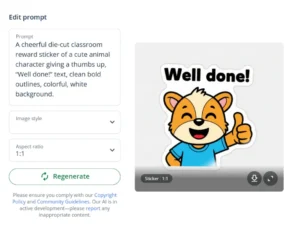
Put your idea into words by entering a description of your sticker design into the AI sticker generator’s prompt box. Specify things like character, gestures and expressions, style, and speech bubble text. For example:
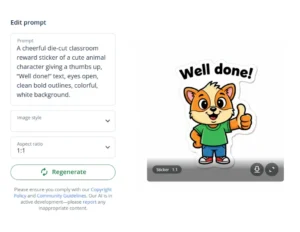
“A cheerful die-cut classroom reward sticker of a cute animal character giving a thumbs up, ‘Well done!’ text, clean bold outlines, colorful, white background.”
AI sticker generator prompt
2. Generate and improve
Next, click the generate button to see how the tool has interpreted your prompt. If you like the generated image, then save it by clicking on the download button. If it needs some tweaking, first try a few more versions with the same prompt—each time you click “generate,” you’ll get a different result.
If the stickers still aren’t quite right, edit your prompt to add, remove, or clarify a detail. Try a few generations with your new prompt to see if it produces a sticker you like. Keep repeating this process until you create a design you’re happy with.
For example, if you want the character’s eyes to be open rather than closed, you could add “eyes open” to your prompt.
Improved sticker generator prompt
3. Prepare the image
Depending on how you plan to use your sticker, you might need to process the image before adding it to a messaging or social media app or importing it into software before printing. This could mean converting your sticker image to a different format, adjusting its size, or creating a transparent background.
Quillbot has a suite of free tools to help with tasks like these, such as Quillbot’s free Image Converter and free Background Remover.
Generating stickers with AI
If you enjoy generating stickers with AI, you can use an AI sticker maker to create all sorts of different custom stickers.
| Type of sticker | Examples |
|---|---|
| Social media stickers | Add stickers to Instagram Stories and other social media posts to make them more eye-catching, fun, and personalized. |
| Messaging app stickers | You can use custom stickers in apps like iMessage and WhatsApp to react and express emotion in a more personal way than with emojis. |
| Stickers for cards | Kids love sticking decorative stickers to greeting cards, invitations, and thank-you cards. |
| Stickers for school | If you’re a teacher who uses motivational stickers with your students, you can create custom designs that tie in with classroom themes, topics, or seasonal activities. |
| Stickers for your business | Add your logo to an AI-generated sticker to create a branded design for packaging, promotions, or labeling. |
Frequently asked questions about AI sticker generators
- How can I print stickers made with an AI sticker generator?
-
The easiest way to print stickers made with an AI sticker generator is to arrange multiple designs on one page, print the page on special sticker paper, and cut the stickers out with scissors.
If you want a more professional finish, you can use a cutting machine to create neat cut lines around each sticker, making them easy to peel.